
1. Home
  2. Shop
  3. Indicators
  4. Trade Analyzer PRO

See which target multiple your setups actually reach.

Mark entry and stop on a NinjaTrader 8 chart, and Trade Analyzer PRO checks the bars that follow for target and stop touches. Built for traders who review setups after the session.

7-day trial · No card · Works with NinjaTrader 8

4.9 · 15 reviews We usually reply within a few minutes
What you get

Your trade, readable at a glance.

01

Entry and stop marking

Place a setup with the middle mouse button or your configured key combination, and preview the risk area before the second click.

02

Four target multiples

Show or hide Target 1 to Target 4 and set the R multiple you want each one to test.

03

Honest outcome states

Targets come back as hit, missed, bypassed, pending or ambiguous, and a bar that touches both stop and target is marked ambiguous.

04

CSV and web report

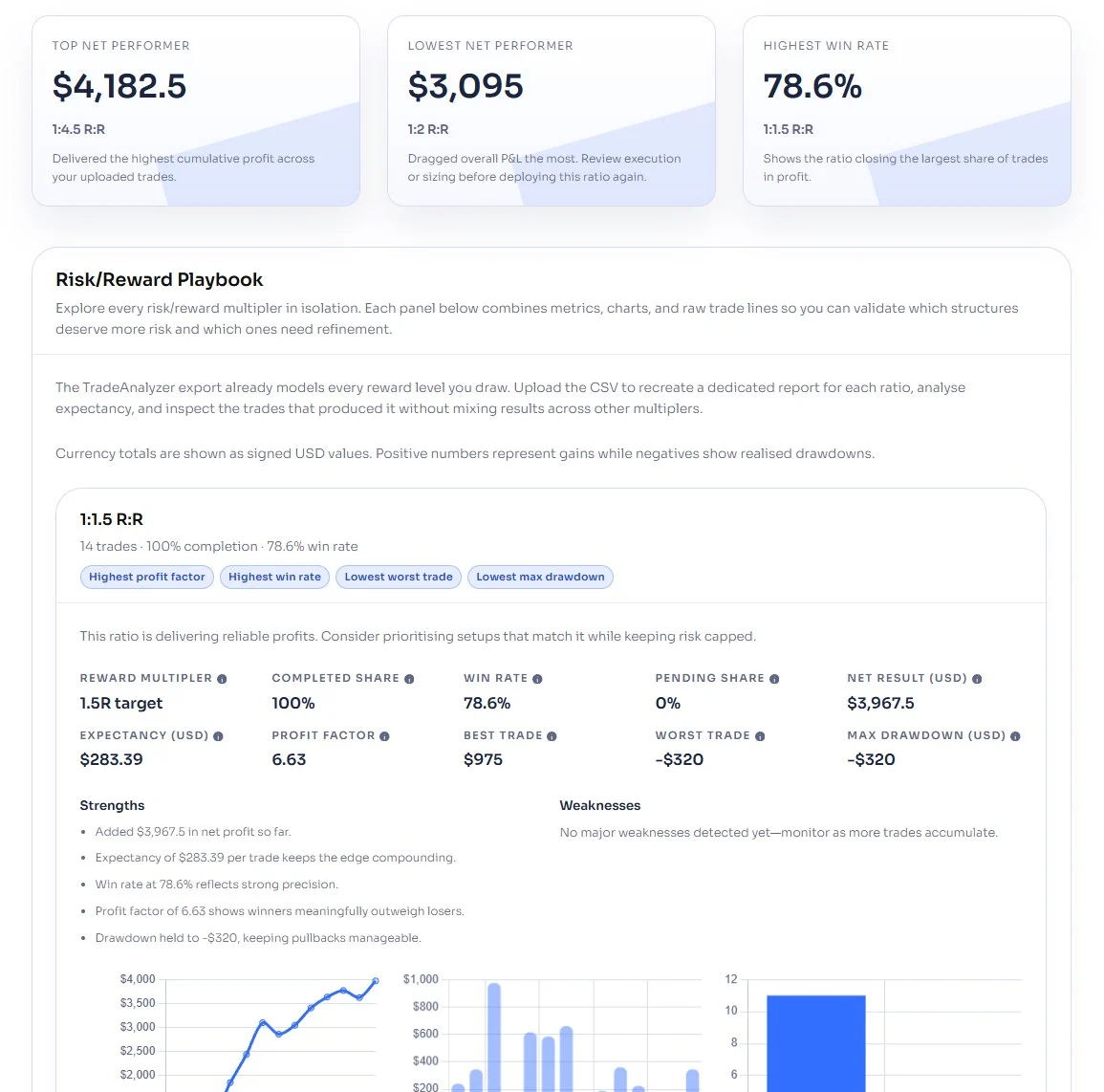
Export trade ID, direction, prices, risk, target multiple, status, result multiple and hit time, then upload the file to the web report.

How it works

Inside a live trade.

1

Mark the setup

Place entry and stop on the chart with middle mouse or your configured key combination.

2

Check the preview

Move the mouse after the first click to see the risk area and target levels before the marker is saved.

3

Set the targets

Choose which of the four targets to show and the R multiple for each one.

4

Export and review

Click Report to save the CSV under Documents, then upload it to the web report.

Pricing

Try it free, then pick a license.

7-Day Free Trial
Free
Download free trial
Annual License
$147 / year
Get annual
Lifetime License Best value
$197 / once
Get lifetime

The trial is available once per user. Prices in USD.

What traders say.

Product feedback

4.9 15 reviews
  1. DIana Bennett Verified owner
    5/5

    Less overwhelmed with the results I felt once I could compare the reward targets together. I started by marking entry and stop on a small batch of setups. After thinking about how often I changed targets based on one trade, the comparison felt especially useful. While travelling, I reviewed the exported results on my laptop during a quiet appointment between trains. Gives really important insights about trades you take and what you do. I like it a lot.
  2. Bashir Verified owner
    5/5

    My opinion: Very good professional tool for reviewing your trades. Gives you detailed information about how you can improve your trading. In my case it showed that my trades are MUCH better off when I use 1:1.5 with no BE trigger. Thank you for the insights!

  3. Sheila Verified owner
    5/5

    its neat

  4. Chewy Verified owner
    5/5

    I was not sure at first, but I needed a better way to review trades without digging through everything manually. Trade Analyzer feels built for tracking performance and I use it after active trading days. My first impression was that its clean and not too hard to follow. The reports are useful, performance has been consistent, and it helped me spot probly a few weak areas in my routine. Better than guessing from memory. It is not a trading system by itself, just a review tool, but that’s the point. Worth 4.5/5

  5. Kevin James Verified owner
    4/5

    I’m someone who likes reviewing results after the fact, and I used Trade Analyzer to check my recent trading activity. It performed well for sorting through the numbers and showing patterns I could actually use. Overall I’m satisfied.

  6. Rose Verified owner
    5/5

    Useful breakdown of past trades, and it kind of helped me notice habits I was missing before.

Need a hand setting it up? That is normal here.

Most traders are up and running in about five minutes. If anything is unclear, message us and we will walk you through it.

Quick answers.

Does it place live trades?

No. It is a review and analysis tool. You mark trade ideas and it does not submit orders.

Does it work with NinjaTrader 8?

Yes. It is built as a NinjaTrader 8 indicator and runs on charts.

Can I mark historical setups?

Yes. Mark a trade on a historical area of the chart and the indicator checks the bars that follow.

Where does the CSV go?

The Report button writes files to a TradeAnalyzerReports folder under Documents.

What if a bar touches the stop and a target?

The outcome is marked ambiguous, because bar data alone cannot prove which came first.

How do I remove a marked trade?

Click the marked area, line or level to remove that trade, or use Clear to remove the saved markers.

How many targets can I test?

Four. Each one has its own R multiple and can be shown or hidden.

Is the trial free?

Yes. The 7-day trial needs no card and is available once per user.

Try it on your own charts.

14-day trial, no card needed. Works on NinjaTrader 8 and installs in about five minutes.